


The Next Big Thing in Photoshop for Fashion Design Portfolio Cover Page Design
In the ever-evolving world of fashion design, presentation matters just as much as creativity. Whether you are a budding designer or a professional preparing your fashion design portfolio, the first impression often starts with the portfolio cover page design. With the latest advancements in Adobe Photoshop, designers now have powerful tools to make their portfolios stand out like never before.
Transforming Fashion Portfolios with Photoshop
Gone are the days when a simple layout or a static cover page could suffice. Today, Photoshop for fashion design is redefining how designers showcase their talent. From dynamic typography to high-resolution digital illustrations, the tools available in Photoshop allow fashion students and professionals to create eye-catching portfolio covers that reflect both innovation and style.
Some of the latest trends include:
-
3D Text Effects: Using Photoshop’s 3D capabilities to make your portfolio title pop with depth and texture.
-
Layered Visual Compositions: Combining sketches, textile patterns, and photography into cohesive, visually appealing cover designs.
-
Custom Brushes and Textures: Simulating fabrics, embroidery, and other textures digitally to give your cover an authentic fashion touch.
-
Interactive Elements: Integrating QR codes or AR features that link to digital portfolios or runway videos.
Why Your Portfolio Cover Page Matters
A fashion design portfolio is your personal brand. The cover page is the first thing potential employers, colleges, or clients see, and it can make or break the initial impression. Photoshop empowers you to:
-
Highlight your signature style
-
Communicate professionalism and creativity
-
Stand out in competitive fashion design environments
Tips for Creating a Standout Portfolio Cover Page
-
Keep it Minimal, Yet Impactful: Avoid clutter; let your main design or signature illustration shine.
-
Choose Colors Wisely: Colors should reflect your brand and harmonize with your overall portfolio theme.
-
Typography is Key: Experiment with modern fonts, bold text, and creative alignment to make your title memorable.
-
Incorporate Personal Elements: Your sketches, logo, or motifs can give the cover a unique touch.
-
Optimize for Print and Digital: Ensure high resolution for print and web-friendly formats for digital sharing.
Photoshop Skills Every Fashion Designer Should Master
To stay ahead, learning the following Photoshop techniques is essential:
-
Layer masks and adjustment layers
-
Pen tool and vector drawing
-
Smart objects for non-destructive editing
-
Filters and blending modes for creative effects
-
Typography manipulation for fashion-oriented designs
Final Thoughts
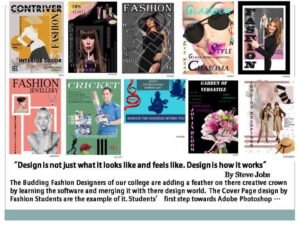 The next big thing in Photoshop for fashion design portfolio cover page design is all about combining creativity with cutting-edge digital skills. A well-designed cover page not only enhances the aesthetic appeal of your portfolio but also communicates your professionalism, vision, and style to potential clients and institutions.
At Trytoon Academy, we guide aspiring fashion designers to master Photoshop techniques, portfolio creation, and presentation skills to ensure they stand out in the competitive world of fashion. Whether you’re preparing a college admission portfolio or a professional client showcase, the right portfolio cover page design can make a lasting impression.
The Next Big Thing in Photoshop For Fashion Design portfolio cover page design
Powerful Habits to Master for Success in Photoshop for Fashion Design working knowledge of Adobe Photoshop is a must for anyone trying to jump-start a career in fashion. Will Photoshop big tools for visualise creativity in this Fashion design course, which our trainer helps beginners get up to speed with this essential Photoshop software. How Photoshop for Fashion Design Works improve design visualisation ,its very interesting to learn photoshop design different essential fashion works like fashion illustration ,pattern making and also important how to work with existing marker or watercolor illustrations and create professional-looking layouts for your fashion portfolio.
Trytoon Academy provide different software application for improving creative visualisation for Fashion design students in details of Photoshop,Adobe Illustrator,CorelDraw,Lectacad,Autocad specialisation fashion design where fashion design students get to translate their creative illustrations and fashion design over into a digital format using Photoshop and other softwares.